Weighing automation

Weight, number, photo and video of every railcar — in one record

The hardware-and-software system turns railcar scales into an automated weighing station. A train is weighed statically or in motion without an operator, a neural network reads the number of every railcar, photos and video from IP cameras are attached to each record, and an Excel or PDF report takes one click.

The system is an option for Modul railcar scales: the scales work without it, and with it they gain a weighing archive with photos, photo and video logging, remote access and remote control.

At its core is Rail Scale Module, software developed in-house. It connects to the weighing terminal and the cameras already installed at the scales and runs on an ordinary Windows PC in the weighing room.

Static weighingIn-motion weighingNumber recognitionRTSP IP camerasExcel and PDF reports
Download the questionnaireSystem overview (PDF) →

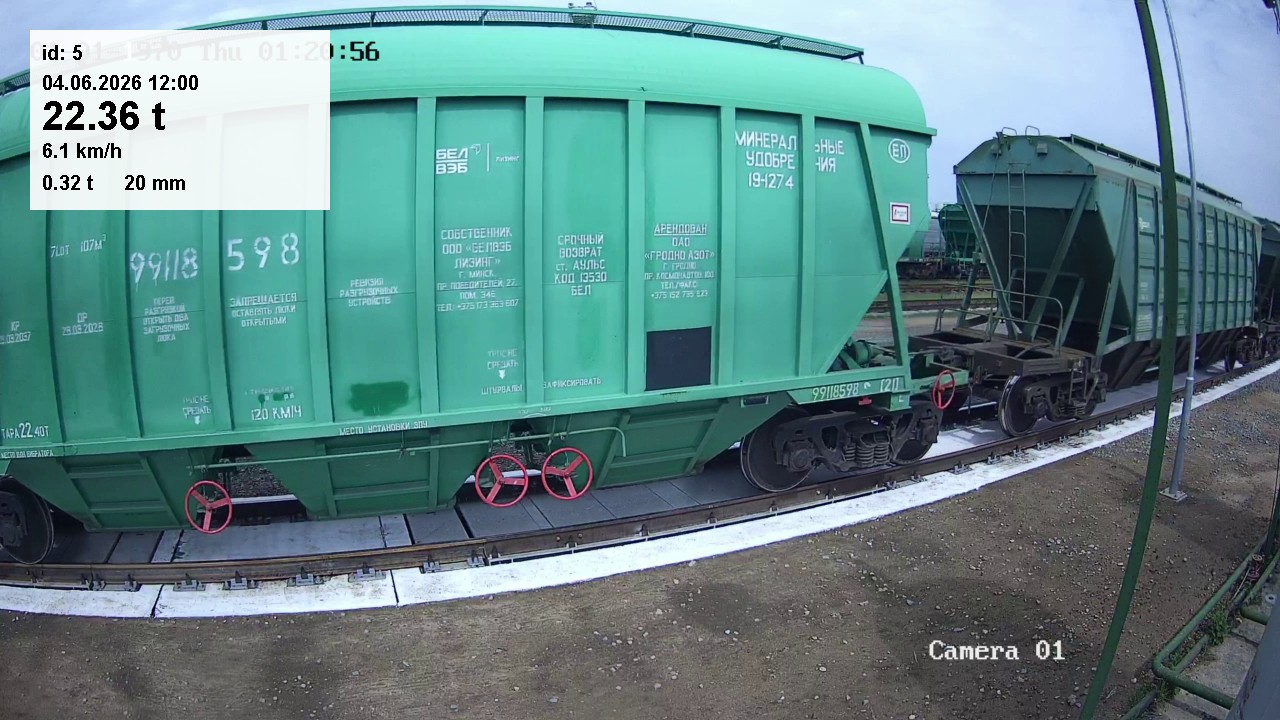
IP camera frame: record number, date, weight and speed overlaid on the railcar image
3 modesstatic (manual mode), static (automatic mode), in-motion
Recognitionrailcar numbers with check-digit validation
Archivephotos and video of weighings
Customer feedback

What users of the system say

«The software of the hardware-and-software system… automatically identifies the railcar type and performs weighing, photo logging of the railcars being weighed, archiving and integration with the Neft i Kapital software 24 hours a day.»
Lukoil-Belorussia, testimonial dated 25 July 2021Two scale systems with the hardware-and-software system for 4- and 8-axle tank cars, in service since 2018. The scales have run around the clock for more than three years.
Open the letter (PDF, in Russian) →
«The supply of the “automatic railcar-movement organisation, video logging and weighing-process recording system” made it possible to weigh railcars statically at night with no operator present.»
Rudensk gas filling station, a branch of Minskoblgaz, testimonial dated 22 August 2016A weighing automation and video logging system on railcar scales.
Open the letter (PDF, in Russian) →

Quotes are translated from the Russian originals. All testimonials →

Benefits

What the customer gets

The system takes the routine off the weighing station and leaves evidence for every weighing.

A station without an operator

Weighing runs in automatic mode: the software records the weight by itself and the LED display board tells the shunting crew what to do. Customers run the station around the clock, including at night with no operator.

Fewer disputes over weight

Frames from both cameras and the pass video with the weight overlaid are attached to every record. Disputes with suppliers are settled from photos and video.

No manual number entry

A neural network reads the railcar number on the weighing-room PC — no cloud and no subscription — and a number can be re-read from the saved frames. Data goes to the customer's software automatically.

Archive and reports

A database with photos and video: select any shift, day or period, export reports to Excel and PDF, send them by e-mail. Integration with the customer's accounting system — at Lukoil-Belorussia, with Neft i Kapital.

Comparison

Scales without the system and with it

The system is an option: Modul railcar scales work without it. Here is what changes with it.

ParameterScales with the terminal onlyScales with Rail Scale ModuleWhat the customer gets
Weighing recordA protocol with weight and time is stored in the terminalA database record: photos, video and the railcar number linked to the weightDisputes over weight are settled from photos and video, not from a single figure
Railcar numberEntered by the operatorRead by a neural network on the weighing-room PC; can be re-read from the saved framesNo typing errors and no delay for number entry
Station operationThe operator monitors the scales and runs the processAutomatic mode: the software records the weight itself and the display board guides the crewA station that can run without an operator, including at night
Storage and reportsProtocols stored in the terminal and viewed in its web interfaceMySQL / MariaDB database, any period, reports in Excel and PDF, e-mail deliveryReports ready with no manual preparation
Remote workAccess through the terminal's web interfaceA copy of the terminal and remote control of the scales from the operator's PC, plus videoThe operator does not have to walk to the terminal in the cabinet

The weight is still determined by the weighing terminal: the system receives the result from it and supplements the record with the railcar number, photos and video.

Photo logging

Weight, number and photo of every railcar

Disputes with suppliers over railcar weights can be resolved from photos and video: every record keeps frames from both cameras, and for in-motion weighing the whole train pass is recorded.

Train panorama built by the software from the pass video

A train panorama the software builds from the pass video. Scroll sideways or click to open it in full

01

Weight on the image

The software overlays the record number, date and railcar weight onto the camera frame.

02

Validated numbers

The neural network runs on the weighing-room PC — no cloud and no subscription.

03

Train panorama

For in-motion weighing, the software builds one long image of the whole train from the pass video — handy for review and archiving.

Operating modes

Static and in motion — two scenarios of one system

The system works in three modes: manual static, automatic static and in motion.

Static weighing with no operator: the display board informs the crew

In automatic static mode the software records the weight of every railcar by itself, while the LED display board tells the shunting crew what to do.

  1. “Waiting for railcar”The scales are ready for the next railcar. Railcars are moved on and off without jolts or impacts.
  2. “Stabilising weight”The railcar rolls onto the platforms. The outer wheelsets must be at least 300 mm from the platform edge.
  3. “Recording weight”Once the weight is stable, the software records it and shows the railcar mass on the board for 3–5 seconds.
  4. Data uploadAfter weighing, once the scales return to zero, the data is sent to the customer's software automatically after a configurable delay.

The weight controller and the PC can run around the clock if needed.

How in-motion weighing works

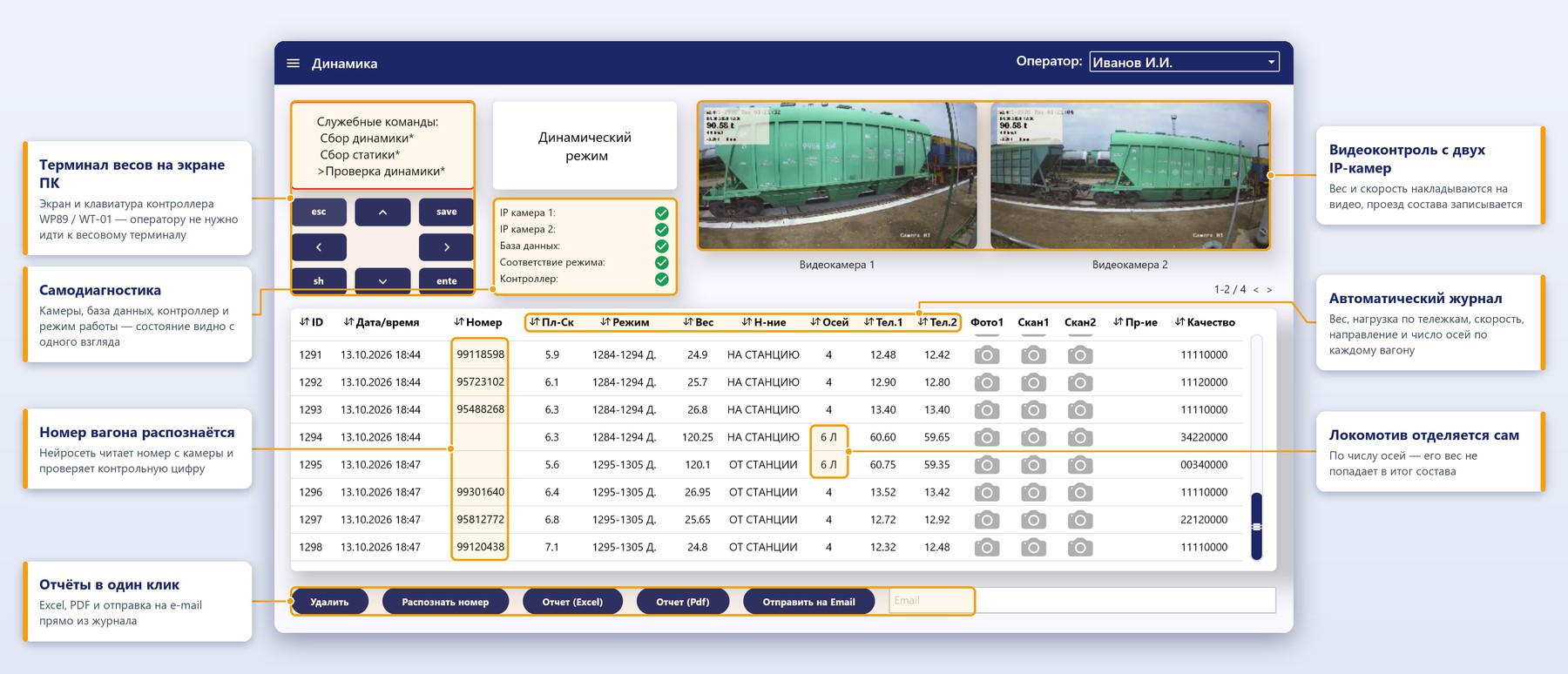
From the train's arrival to the report — with no operator. The software receives weight, bogie loads, speed and direction from the weight controller and video from two IP cameras.

  1. Train passing over the scalesThe terminal signals the start of the pass and the software starts recording from both cameras.
  2. After the railcars have passedWeight, bogie loads, speed and number of axles arrive for every railcar.
  3. Number and photoA frame of the railcar is picked from the video; the neural network reads the number and validates the check digit.
  4. ReportThe record goes to the database. The report is exported to Excel and PDF or sent by e-mail.

The locomotive is identified automatically by a unique algorithm and its weight is excluded from the train total. The terminal display and keypad are mirrored in the software, so the operator never has to walk to the instrument.

Dynamic screen: scale terminal on the PC, self-diagnostics, video from two cameras and the automatic log
Interface

Software screens

Click a screenshot to read the callouts.

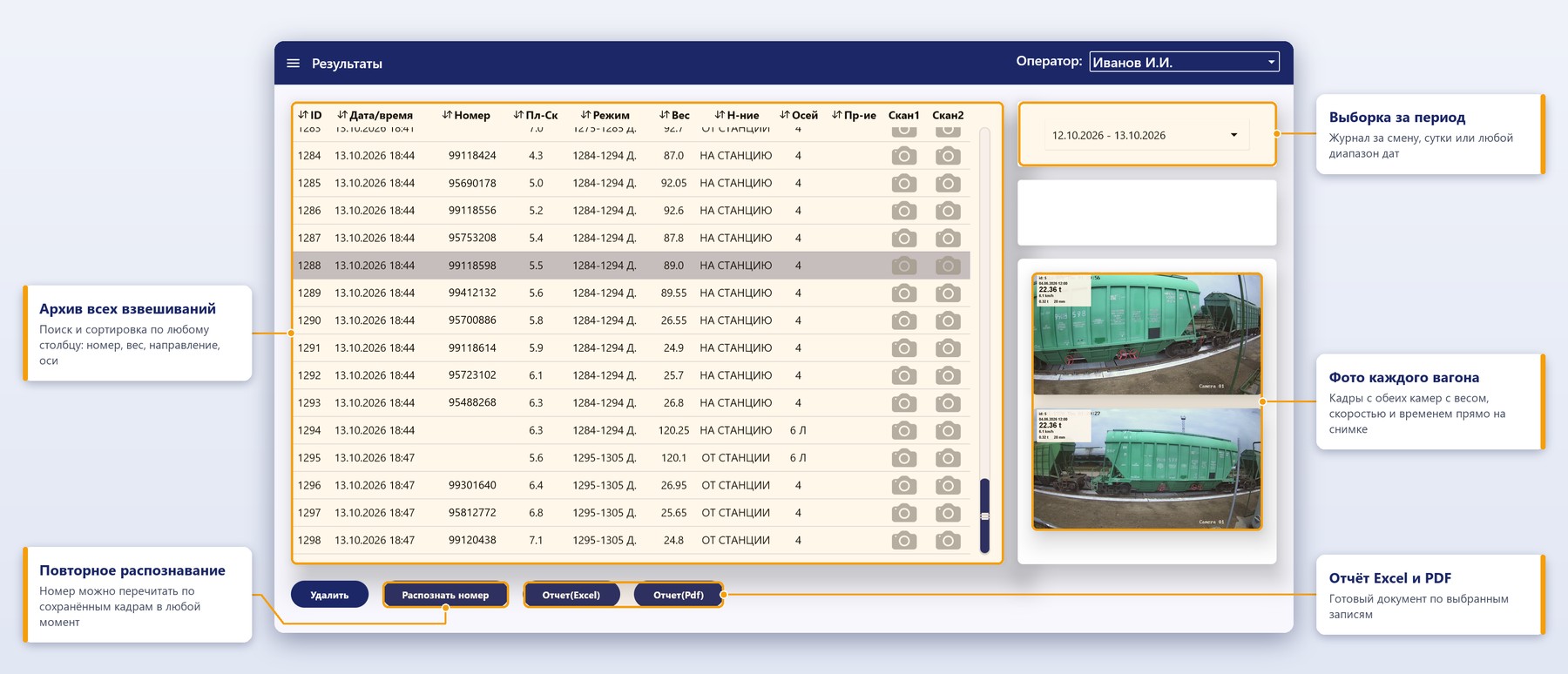
Results screen: weighing archive with photos

Results

A weighing archive with photos: select a shift, a day or any period, sort by any column and view frames from both cameras for the selected record. A number can be re-read from the saved frames at any time.

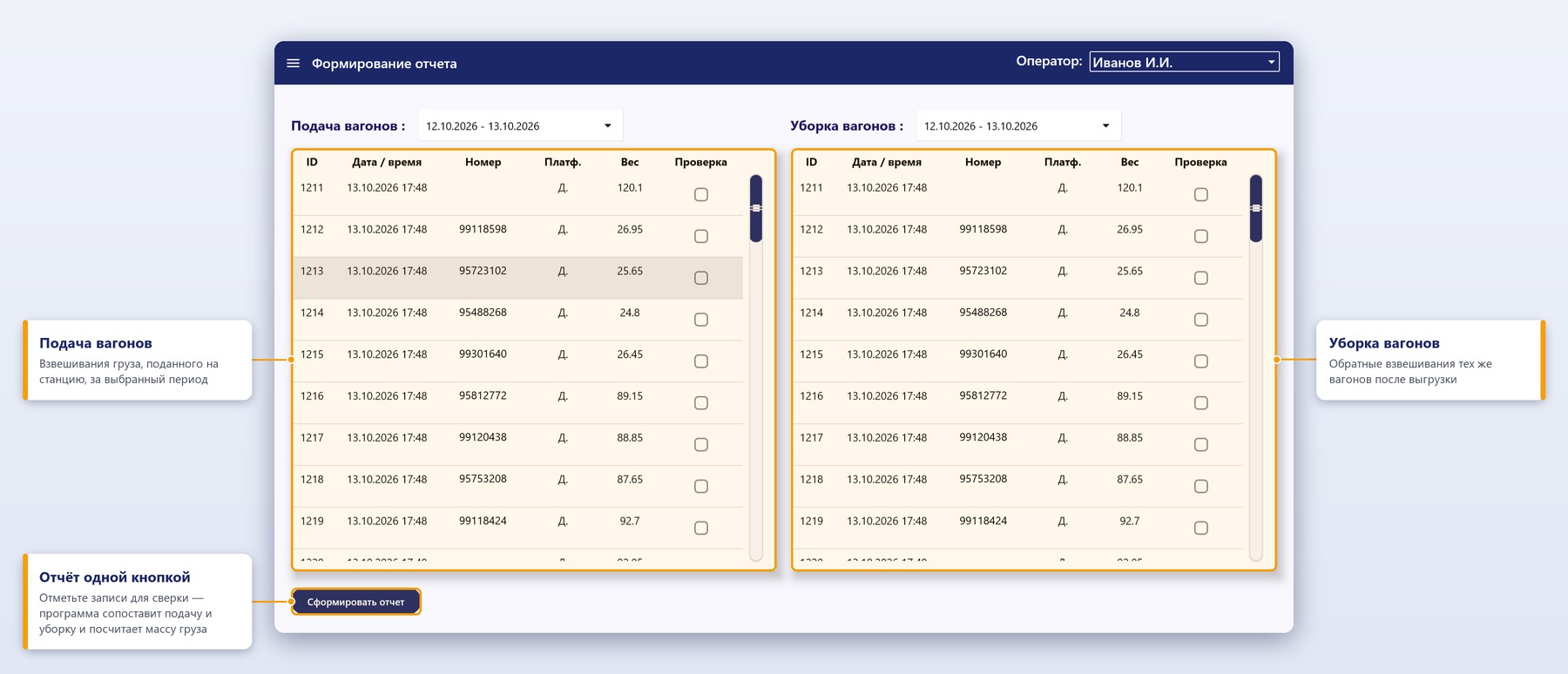
Report screen: railcar delivery and removal

Delivery and removal

Weighings on delivery on the left, on removal of the same railcars on the right. Tick the records to reconcile and the software calculates the cargo mass for every railcar.

System composition

A turnkey weighing station

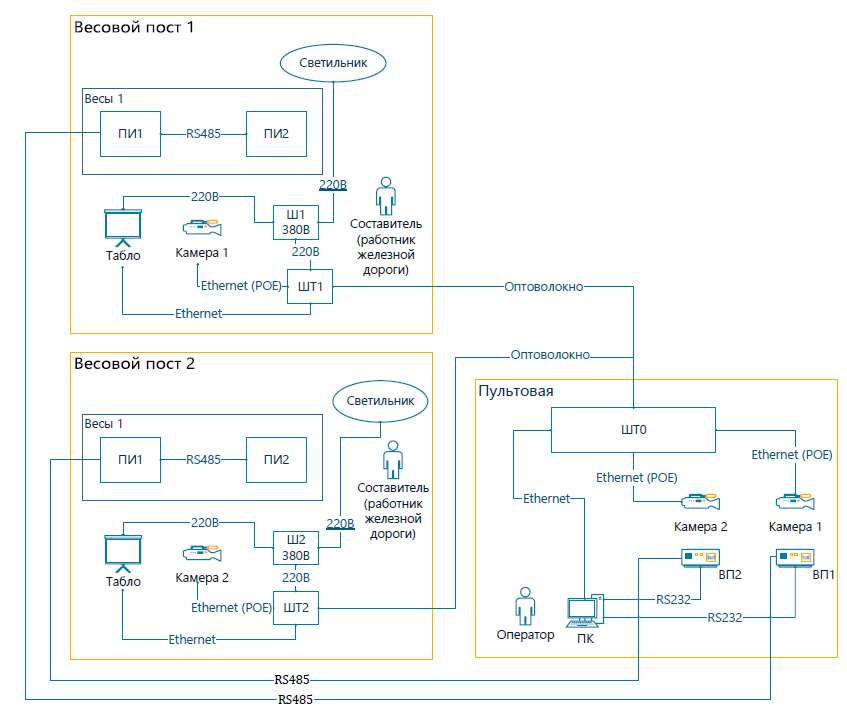
The system is supplied together with the scales or retrofitted to scales already in service. Standard configuration:

  • Outdoor cabinet — weatherproof and insulated, with climate control, a viewing window for the weight terminal, an external keypad and a PoE switch. The weight terminal works inside the cabinet in any weather
  • Operator-room cabinet — network switch and video recorder
  • Operator PC with Rail Scale Module pre-installed
  • Two IP cameras, Hikvision or equivalent, with junction boxes and mounts
  • LED weight display board with mounting
  • Android app — free of charge

One operator console can serve several weighing stations, with remote scales connected over optical fibre.

Diagram of the hardware-and-software system: two weighing stations and a control room
Train scanning and number recognition are also being developed as a separate product — see AI train-scanning camera.
Configuration

A weighing station with loading control

For bulk-cargo loading points the system extends into railcar loading control: the operator sets the target mass and the system opens and closes the hopper gates based on the scale readings.

Equipment

  • Operator workstation — Core i7 PC, 16 GB RAM, 1 TB SSD, 27″ monitor
  • Indoor telecom cabinet — UPS, video recorder storing video from 4 cameras for at least 30 days, optical patch panel
  • Outdoor telecom cabinet — stainless steel, IP54, corrosion class C4, thermal insulation and climate control, UPS, viewing glass for the weight terminal, external keypad
  • Local control cabinet — industrial panel controller with I/O modules and safety interlocks, manual and automatic loading control
  • 4 IP video cameras — numbers are read from both sides of the railcar, on the body and on the frame

Software and functions

  • Workstation software features: virtual weight terminal, video, number reading with manual correction by the operator, event log, settings and user access rights
  • Loading control: the system records the tare, permits loading, tracks the mass gain and closes the slide gates once the target value is reached
  • Indication of product levels in the hoppers and of gate status
  • Railcar position on the scales, shown interactively on the operator screen
  • Exchange with plant control systems over Modbus TCP and via an OPC server: weighing results, gate status, hopper levels
  • Cabinet reliability: probability of failure-free operation 0.98 over 2000 hours

The system composition and the list of interfaces are additionally agreed with the customer.

References

The system at work

The system is supplied together with Modul railcar scales — from simple two-platform scales to four-platform scales.

2025

Vitebskagroprodukt

Two-platform static scales

2024

Remput, Belarusian Railway

Two-platform scales for static and in-motion weighing, bulk materials

2021–2024

Terminal Zapad

Scales for liquefied-gas railcars, including two explosion-proof scales

Testimonial (PDF) →
2021

HS Belakon

Two-platform static and in-motion scales, 1435 mm European gauge

2020–2021

Belarusian National Biotechnology Corporation

Four static and in-motion scales, two of them with four platforms

2019

Chess-Bel

Two scales with 3 and 4 platforms for oil-product railcars of different wheelbases

2018

Lukoil-Belorussia

Two four-platform scales for 4- and 8-axle oil-product tank cars

Testimonial (PDF) →

Minsk Tractor Works, Minskoblgaz, Vitebskoblgaz

Automatic weighing under an approved railcar delivery and removal instruction

Testimonial (PDF) →
FAQ

Frequently asked questions

What computer is needed?

An ordinary weighing-room PC running Windows 10/11 x64. The software installs from a single MSI package and starts automatically with Windows. The neural network runs on the same PC — no cloud and no subscription.

Which cameras are supported?

Any IP camera with RTSP support. The standard configuration includes two Hikvision or equivalent cameras with junction boxes and mounts. The software records video, takes photos and builds the train panorama; resolution from 1280×720 to 2560×1440 and the retention period are set in the settings.

How do the results reach our accounting system?

Results are stored in a MySQL / MariaDB database (Oracle 9i and 21c and JSON files on disk are also supported), exported to Excel and PDF, sent by e-mail, with notifications to Telegram, and passed to the customer's software over SSH. At Lukoil-Belorussia the system is integrated with Neft i Kapital.

Does the system change the weighing result?

No. The weight is determined by the weighing terminal; the system receives the result from it and supplements the record with the railcar number, photos and video.

How is a new software version tested?

New functions are developed and tested in the lab on a model of the system and scales, and only then introduced at customer sites. Before a new product is launched it also undergoes failure testing.

How are installation and commissioning organised?

The installation stages and the split of work between Supplier and Customer are described in the installation guide. Supervised installation and commissioning are carried out by Sakha-prom.

Let us describe your weighing station

Fill in the questionnaire: it has a section on automation — photo and video logging, number recognition, weighing modes. We will use it to choose the system configuration and prepare a quotation.

Download the questionnaire

Modul railcar scales →